27
Mar
PhpTliste – An Opensource treeview in php
Author: rberthou
Description
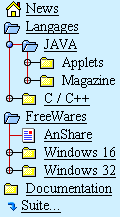
Treeview is the first component that I have developed (at the time in C + + for Windows 3). Since then I accommodate this development in various languages.
So I present you the last of the Tliste family PHP version. This component is a freeware under license GPL.
This component is a set of two classes PHP tliste the base class and rd_l which represents an element of the list. It is, in my opinion, relatively easy to use and easily adaptable. It’s still a “beta” version, which should be cleaned and I think also to produce two distinct versions for PHP-4 and PHP-5.
Exemple
Fonctionnement
Before anything else it is better to see a source code.
1
2
3
4
5
6
7
8
9
10
11
12
13
14
15
| <?php include("tliste.php"); ?>
<html>
<head><title>Exemple tListe PHP</title>
<link REL=STYLESHEET TYPE='text/css' HREF='./tli.css'>
</head>
<body>
<?php
$tree1 = new tliste("_1") ;
$tree2 = new tliste("_2", "txt/tliste2.txt") ;
?>
<table width="80%"><tr valign="top">
<td width="50%"><?php $tree1->display() ; ?></td>
<td width="50%"><?php $tree2->display() ; ?></td>
</tr></table>
</body></html> |
You will notice that there is really few things in this code to generate two independent treeviews in the same page. I will detail it below:
- include(“tliste.php”) :As always we must begin with include component / desired code.
- $tree1 = new tliste(“_1″) ; : Creation of the first treeview giving as an identifier “_1″ and using the default value of other parameters. This identifier “_1″ allows you to use several treeview in the same page (the parameters being passed prefixed by the ID).
- $tree2 = new tliste(“_2″, “txt/tliste2.txt”) ; : reation of the second treeview giving as an identifier “_2″ and by giving advice to seek its description in the file tliste2.txt.
- $tree1->display() ; : Display treeview
Basic Operations
| Fonction |
Parameters |
Description |
| tliste |
$idd = “” // ID du treeview
$sf = “” // data file
$cc = “p1″ // style css |
Constructor : parameters initialisation |
| getParameter |
$sf = “” // data file |
Lectures des paramètres (appelé par le constructeur – je pense la passer “private”) |
| setCsep |
$sP // Caractère séparateur |
setter : définition du caractère de séparation (défaut §) |
| setImagePath |
$sP // prefix de chaque image |
setter : définition du répertoire et préfixe des images (défaut img/ot) cela génèrera des images du type img/ot5.gif |
| readFile |
$sP // fichier |
Lecture du fichier fourni en paramètre |
| display |
- |
Affichage du treeview |
| addElt |
$sP // Element sous forme de chaine |
Ajoute un item a la liste; Sont format est du style :
0 § Titre § 5 § http://www.berthou.com/fr/ § ?Mon blog |
Format du fichier (option)
| Colum |
Name |
Type |
Description |
| 1 |
Level |
Integer |
Item level 0..20 |
| 2 |
Item Name |
string |
Name of item (URL of bitmap if level 99) |
| 3 |
Bitmap number |
Integer |
Item bitmap (0..9)
Rem : MOD(2) = 0 => treenode close (if node)
MOD(2) = 1 => treenode open (if node)
2 node disable.
sample if node “0, 10,12,20,…” => node close
“1, 11,13,21,…” => node open
|
| 4 |
Dest URL |
string |
Dest. URL ( begin “./” if local URL ) |
| 5 |
Target |
string |
Target Frame (overide default ) |
| - |
Help Bullet |
string |
Begin with “?” String help display in bullet, you can define this param in 5, 6 or 7 col. |
Téléchargement
phptliste.zip
Filed under: OpenSource, php


7 Responses pour"PhpTliste – An Opensource treeview in php"
Great application. good thing it’s open source. I would work a little bit to icons, to make them more web 2.0 like.
congrats
Thanks for your comment…
Yes, I think that a Web 2.0 like version is very usefull. I make some tests to use JQuery with PhpTliste.
Dear Sir,
I downloaded your zip code, but it is not the complete one since there is a missing file- php_tliste.php. By the way could you send the complete one to me please?
Thank you in advance!
php_tliste.php
I downloaded your treeview open source zip code, but it is not the complete one since there is a missing include file- php_tliste.php. By the way could you send the complete one to me please?
Thank you in advance!
Sorry but’s it’s an error in zipped file
php_tliste.php => tliste.php
Hello support team
We are devolving site using Joomla 1.5.x CMS. we are looking for Tool which will fulfill our following list of features
1) Folder structure (Tree).
2) Non restricted folder structure (Tree).
3) Folder Tree at any depth level.
4) Integration with Joomla 1.5.x CMS.
5) Restricted folder access permissions by Joomla login User type.
Could you please tell us, will our tool fulfill /provide all our requirements Or direct us right path.
Regards,
Narendra
Only the list items “0″ appear in the list. None of the 1′s, 2′s or 3′s etc appear. Any ideas?
Thanks
Kevin
Ajouter une réponse