5
Sep
Dynamic forms builder with jQuery
Author: rberthou
The project
Recently I have searched a foms editor – wizard” in web mode. I looked for it on internet, believing many projects should greatly deal with this problem (I don’t like to develop something if it already exist). After many tests I have come to the conclusion that it does not exist (or that it is not well “referenced”…).
Also I have taken advantage of my holidays to do this “little” project.
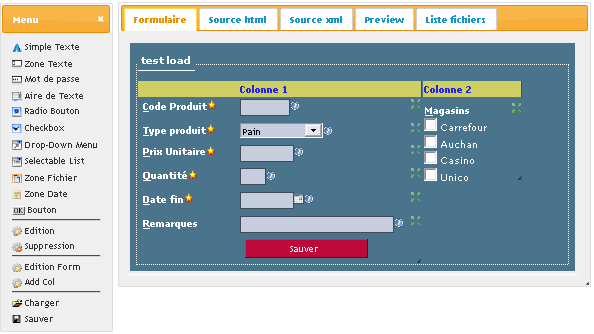
After my research I signal you the following sites which seem quite good but do not fit my objectives (tey were not in opensource).
JotForm : I like the presentation
Wufoo : Seems interessant but an inscription is compulsory.
The goal
It is really simple !
Demonstration rbl_forms
- To permit to construct a html form in 100% web mode (without codeing)
- Not to force to use a library as (jQuery, prototype, dojo,..) in the generated code
- To offer the basics controls (compulsory area, size…)
- To be easily adaptable (it is at you to tell me if this goal has been succesfully reached)
- Not to use table
- To save in XML size
- To generate a page in pure html
Tools used
jQuery : I love it more and more, it’s lib !
jQuery UI : the logical extension to work in web mode.
t_fotm : For the validation part of the form.
The functionalities
To make easier the visual creation of the form the use of the “drag & drop” is very important to register areas of the form or to move them.
There is three levels of personnalisation ( Form, Column, Element ). Theses differents pannels permit to specify with precision the size and the presentation of the form.
The form pannel
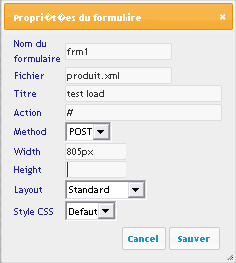
This dialog box permit to specify the following informations (they are activated by cliking on the item “Edition Form” on the left pannel) :
- The name : form name attribut
- The file : to save
- The title : Display in the form (fieldset legend)
- The action : form action attribut (url or other)
- The method : POST or GET
- The size : Appear in the style properti (width, height)
- The layout : unused actually
- The CSS : This gives the principal style of the “form”
In the case of a cration of a new form you must not forgive of modify the “file” area to specify the names of the saving files.
Les colonnes
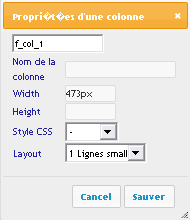
I accept the definition of many column for the construction of theses elements because I don’t want to have too vertically form. I limit it to three column at this day.
You can edit the proprieties of the column by selecting (by a simple click) the line “column 1″ of grenn/yellow color then by clicking on the item “Edition” of the left pannel.
Description of the pannel :
- Name of the column : unused
- Size : (width, height) can be define by resizing the column or by directly keyboarding the values.
- The layout : it is a CSS clss which permit to specify the type of presentation in the column.
- The CSS : other CSS class (at this day undefined but implented)
The item “supression” in the left menu permit to cancel/delete a column with the whole areas.
The areas
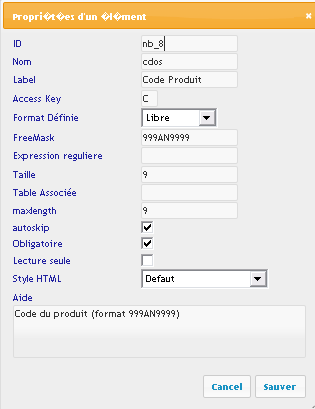
You can add areas in a column of the form by a simple “drag & drop” from the left menu. Also appear a dialog box which invit you to specify some informations (theses data change with the type of area).
- ID : for information (readonly
- Nom : attribut name
- Label : Input information (title / label)
- AccessKey : keyboard shortcut
- Format : standard input mask (email, date, money, …) for input control
- Freemask : you can use this to define other format / mask
- 9 : A digit char 0-9
- # : An optionnal digit char
- A : An alpha char in uppercase
- a : An optionnal alpha char in uppercase
- M : An alpha char (upper or lower)
- m : An optionnal alpha char
- N : An alphanumiric char
- n : An optionnal alphanumeric char
- V : A coma or point
- v : An optionnal coma or point
- S : A sign + or –
- s : A optionnal sign
- T : A char
- t : A optionnal char
- Regex. : a regexp for more complicated control
- Size :
- Table associted : personal use in other project
- max length :
- autoskip : sklip to the next zone if all char is entered
- CSS : style html (class)
- Required
- ReadOnly
- Aide : Help message
Sample form
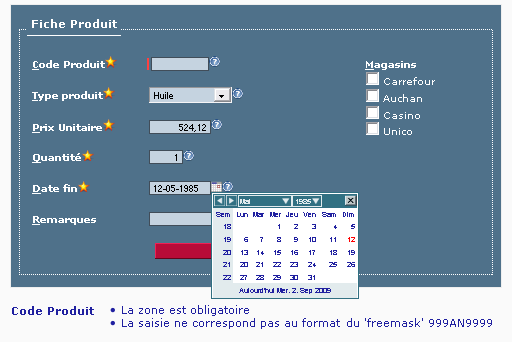
Sample generated form
In the next versions
I would like add many other functionnalities in the next version of this tool.
Je souhaite ajouter plusieurs fonctionnalités dans les prochaines versions de cet outil.
- CSS : Define new CSS styles (form, colonnes, input)
- Translation : Add other language
- Add more complex controles : Captcha, Tabs, …
- Can select other datepicker and forms controles
- Add other load/save script in JSP, ASP, Perl…
- And more….
Do npt hesitate to contact me if you wish to help me in this developement or if you have add a functionality or correct a bug.
Download
rbl_forms last version


57 Responses pour"Dynamic forms builder with jQuery"
Wow, what a script!!Love it, great work! An english language file for the UI would be nice =), I’ll have to try and translate it*g*…are you available for freelance work, just to have asked that =)?
keep up the good work!
LuK
A new version 1.1 is available with :
- english langage support
- minor bug correction
- multi page support (forms with more than 1 panel)
Hey rberthou,
you made a excellent job with developing this.
But the Selectable List doesn’t really work in my case, because it doesn’t save the values… can you help me out, please?
greets Max
(Sorry for the delay..)
Can you send to me more information about your problem ? (error message, …)
thanks
It’s a great project, compliments!!
You talk about a new version (1.1) in english versione; is downloadable?
The version available in this siet is 1.1.1 (an error in title og link sorry)
Great job!! I have the same problem with lack of values in dropdown, radio and checkboxes.
I’ve tryed to enter the values separated by comma, hyphen, semicolon but nothing seems to work. Nothing is displayed in the form although when I edit the element, the values I entered are there.
BTW, in the code there’s no reference to the licesnse. I presume is open source, but can you confirm in some way what do you permit or not to do with your excelente code?
Thank you!
Hi, Excellent package but where is the link to donwload version 1.1.1?
Hi, compliments for your work.
There is 2 bugs in your application:
1)In IE is impossible to create a Form with Form Builder. When you tried to insert any element in the “colonne”, it disappear.
2)In Safari and Chrome, the (?)element and check box are rendered incorrectly.
If you want, i can help you to solve the problems!
Have a nice summary, Alessandro
Thanks,
You can download the last version in this page .
Thanks,
for lak of values you must use a semicolon « ; » without CR (cariage return) in the list.
Sample :
$G$=Alimentation; A1=Pain;A2=Huile; A3=Viande;$G$=Boisson;B1=Eau;B2=Lait;B3=Pastis;B4=Vin;
PS :
You can define group item with the strings « $G$ » .
Hi
I’ve tried to use the form builder but the form workbech (the column) disappears when I try to drag a field. I have tried to save the form but unsuccesfully.
Could you suggest how to solve this problem?
thanks
alex
Hi
I can help for next version for asp
Great work
I love it very much
Thank you. Very good work!
That’s what i’m talking ABOUT…. This is simple the GREAST
Hey,
Im trying to change it to english and the only bit i cant get changed is the “à définir” in the text box when an item is dragged. What do i do to change this?
leanne
You can change “à definir” by “change this” or remove this text .
thats the problem..i can’t find “à definir” in the code. Where abouts is it?
you can found “à définir” in the source file “rbl_elt.js” lines 627, 630 and 633
amazinggg…thank you!
I am looking for more complex options such as skip logic. Ask next quetion based on response from previous one.
Are you availble for consulting?
@Bings Yes it is possible. I just need more informations about your project and your server technologies (php, java, asp…).
Could you contact me with the “contact form” http://www.berthou.com/us/contact/
Thanks
Hey, i was wondering if anyone knows how … once a form has been created by the user … how can you then save it to a database MySQL and then retrieve it when the user wants to view the form again?
even if i didnt get the database thing done… how come when i load the file after saving the form doesnt open?
forget the last two comments, ive got everything working! this is an amazing piece of work!
where abouts in the code is the actual drag and drop method?
Awesome project!
Just wondering if anyone has had a chance to put it together using PHP/Mysql. For example to generate the form then save it to “mysql” and then retrieve for action with “php”.
An example would be very much appreciated!
Merci! :-)
@james : for drag&drop i use a standard JQuery functions. You can see this in rbl_base.js file ( function initDrop ).
@leanne : If you use this tools in a public site can you send to me the url of your application to see this.
Thanks..
@Rodrigo : You can store in Mysql (or other database) the form definition or form data .
It’s good idea and think annd theres options in the next version of this tools…
Hi…
is this possible to add php back end for this tool i m able to make own coding but i dont know from where i have to start exactly… will you please help me ?
BTW this tool is a awesome piece of work… thank you…
I will Provide my work to you if is helpful for other members hence i m not familiar with jquery much… i m not sure how and form where i have to start… i m waiting for any response please help me guys..
Hi, i would like to know if you already have something in asp.net, thanks and great job
Hello, Berthou,
I am editing this Formbuilder generator.
But i found a problem that i can’t fix or i don’t see it.
The thing is when people trying to make there form,
and using dropboxes or checklists, they have to input $ G $ = 19; and etc. I understand but is it also possible that the $ G $ = ; is already generated in the Jquery code. I can’t find the right Js file to fix this problem. i hope you can help me.
Nice job, Thank you for in advanced
Hey Mate!
Love the form builder! very nice! and thank you for making it available!
I was just wondering if you’ve had a chance to implement the PHP side of things?
Rodrigo
Do you know what would be very nice to implement to this form builder?
Payments integration like PayPal. I think it would be very simple to add it on and it will make a huge upgrade to your script. Just a suggestion.
Thanks for your work!!
Looks great but I’m having the same issue with the column dissapearing. Have you found a resolution?
Thanks in advance.
Hi,
You have done a great job, bur it is not working in IE.
I have downloaded the latest version today itself “RBL_Forms V1.1.1″
Can you suggest me, how it can work in IE.
Regards,
Raj
Hi,
Can you send to me more information about your problem (IE version, error message, javascript console, …)
Thanks
Form builder is awesome….Excellent Work!!
I want to use know how you are appending the code in the htmsource. i am really confused
Great Application, Good work, but why its not working in IE 8, The moment i drag any controls, the column in the form vanishes, kindly help, thanks.
Hi,
Great job, but i wondering is it possible to add custom control ( server control ) ?
regards
Very cool, but English language experience sucks.
You should not mix languages.
tank you for help and source
Hi, i downloaded your form builder and was exploring it. When i try to drag and drop the compnents a window appears it sees like the properties window for the conmpnent added but it appears blank. I don’t know aht’s happening. I am using Chrome Browser. Please help me out.
Hi,
How much time you took to build this entire app?
Just curious about the effort you have put.
Hi,
Also do you have any update on adding advance controls like Tabs, Sliders, Captcha and other controls.
@Nikhil Mahajan : The windows properties box is blank if you use this tools without a http server (it’s a browser security) It’s Ok if you run this tools in an http serveur on with Firefox
@Kalyan :
I’m not sure how long I took to develop this tool. I have work for a month but very irregularly. I think that day was the total spend 6 or 7 full days
I currently have no plans to rework on the project. Add enouveau control poses no particular problem except the choice of the javascript library.
Hi,
I have same problem as @Nikhil Mahajan, how to make it work on Chrome browser?
Please tell me from where i can get whole html contents
I want to store then in saperate file…
Hi rberthou ,
first of all very thanks to share this project. my question is that one i have set a form ans save as test.html. next time i want to edit that test.html form . i have try to load form from list of pages but getting blank area what is the issue and where i am going wrong plz help me about this.
Awesome work! It worked great in Chrome and Firefox. How can I get it to work in IE?
Hello,
How can we add new element property like “Parent Control”
I added inside input_text.html however & for run time i set / get that property values
rbl_edit.js
———————–
this.saveForm = function() {
//add
this.e_parent = jQuery(“#parent”).val();
——————-
this.showForm = function() {
//add
jQuery(“#parent”).val(this.e_parent);
——————————–
function loadElement( elt, ncol, nbel) {
//add
rblEltArray[ _id ].e_parent = ( ( jQuery(elt).attr(‘parent’) ) ? jQuery(elt).attr(‘parent’) : “” ) ;
———————————
Now i want to store that inside HTML form how can i solve this?
like parent = “good”
Please advice
Thanks
Nishant
Very nice. If you want expand it in something large. Then please email me. I can say the monthly user visit be more than 50K.
thanks
Ajouter une réponse